Every plan
Sell at the counter on your phone
Use one phone or tablet as your shop’s POS. No POS terminal to buy.

Sell at the counter, take cash or a PromptPay QR, track stock and see sales from anywhere, on the phone or tablet your shop already has.
Already have a shop? Sign in to the back office


The app hides the menus your shop doesn’t use. Change it any time.

Less sweet, cup size and toppings in one tap
See the POS for this kind of shop
Park bills in a queue, open and close shifts with a cash count
See the POS for this kind of shop
Scan barcodes with the camera and track stock on every item
See the POS for this kind of shop
No POS terminal to buy, and you can move your pitch every day
See the POS for this kind of shopEvery card shows its plan. Features you can use free say Every plan.
Use one phone or tablet as your shop’s POS. No POS terminal to buy.
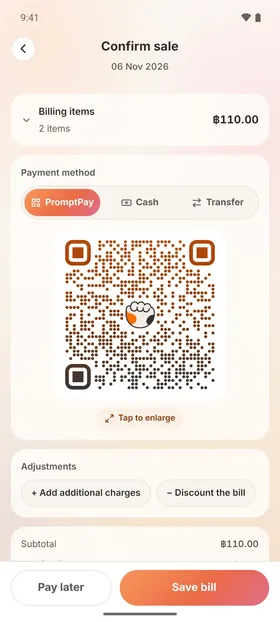
The app makes a QR for the bill amount for customers to scan with their banking app. Money goes straight to the shop’s account.
See daily sales and your best sellers from anywhere, going back 30 days on Go.
Every bill takes stock off for you. Items running low turn yellow, sold-out items turn red.
Sign up with a mobile number, earn points on every bill, and move up through Bronze, Silver and Gold.
Staff can use it at the same time. Party covers 3 branches, with stock transfers between branches.
Add just 2 or 3 things you sell to start. Add the rest later.
GoFree for good
฿0Free for good
No card needed
PlayMost popular
฿129฿1,229/ month/ year
or ฿1,229 a yearSave 21%฿1,548Save 21%
PartyTry free for 30 days
฿299฿2,329/ month/ year
or ฿2,329 a yearSave 35%฿3,588Save 35%
Create your shop in the app and get Party free for 30 daysAfter that, back to Go, still freeNo card needed. When you choose a plan yourself, pay with PromptPay or transfer in the back office.See all plan details
Anything else? Message our team on LINE.
No. A new shop gets Party free for 30 days as soon as it is created. Nothing is charged automatically. We don’t take cards; pay with PromptPay or transfer when you choose a plan yourself.
If you haven’t picked a plan, the shop moves to Go and you keep using it free. To keep Play or Party, choose and pay in the back office whenever you like.
Yes. Every bill is saved straight to the system, so the owner sees the latest sales from anywhere. Shop Wi-Fi or mobile data both work.
No. Use the phone or tablet you already have. To print receipts, connect a printer over Bluetooth or LAN.
Yes. Use the camera on your phone or tablet to scan barcodes.
Go is free for good, with no card. New shops also get to try Party free for 30 days first.
New shops get Party free for 30 days, no card needed. After that, the shop moves back to Go and stays free.
Images: every picture of people in a shop is made with AI, the app screens are real Gwak Gwak screens (sample shop data), and photos come from an open image library: Kao Rad Pad Kra-pao with chicken and fried egg by Andy Li (CC0) via Wikimedia Commons